Two panels on the IT asset record build a complete operational history: Maintenance and Tickets.
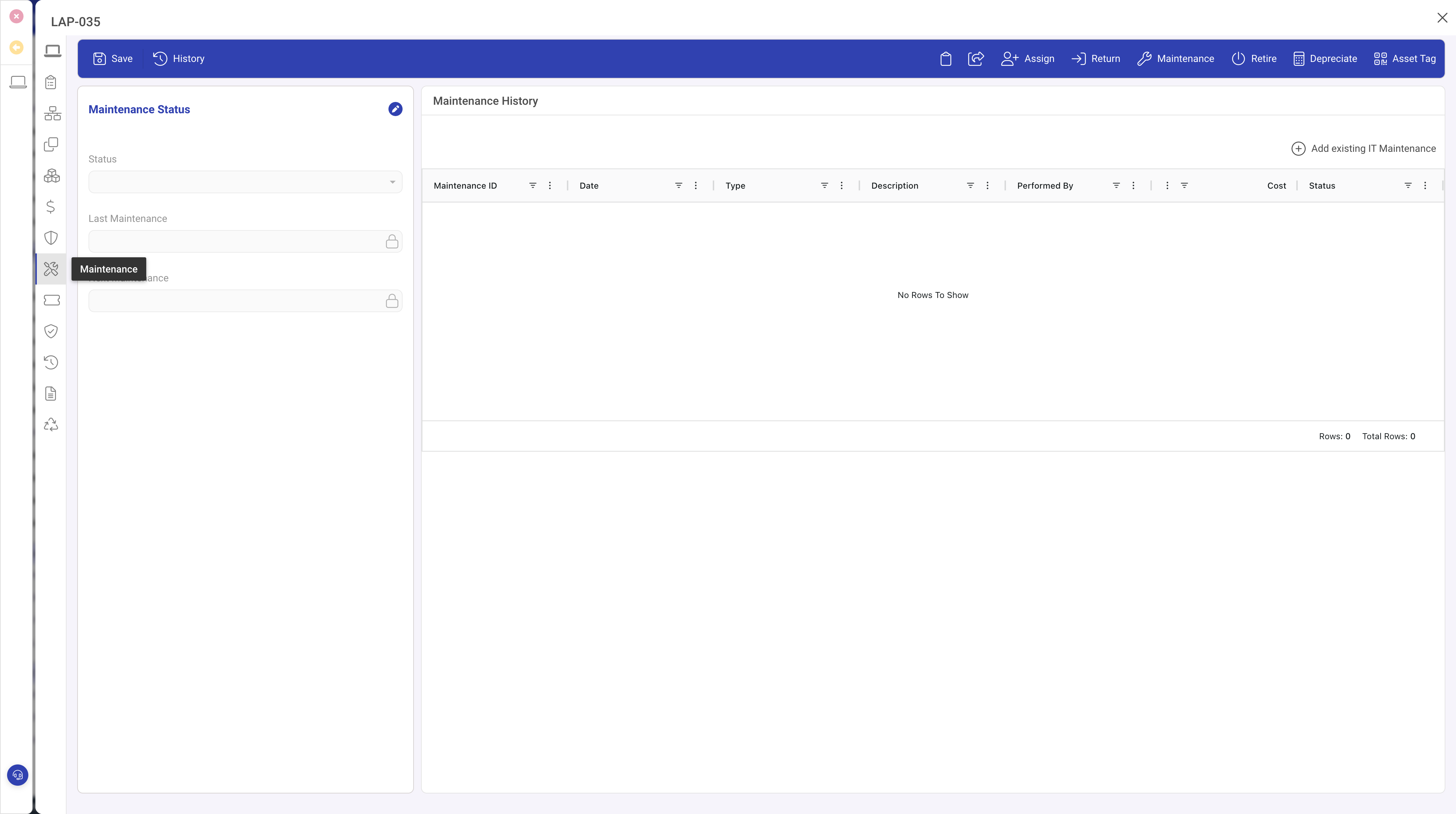
Maintenance panel
A related list of maintenance records. Each record represents a maintenance event (scheduled check, repair, upgrade, cleaning) with fields for:
- Type: scheduled maintenance, repair, upgrade, cleaning, or other.
- Description: summary of the work performed.
- Scheduled Date and Completed Date.
- Performed By: who carried out the maintenance.
- Cost: the expense.
- Outcome: successful, partial, or failed.
- Notes: additional observations.
Use the Maintenance toolbar action to create a new record pre-linked to the asset.
Tickets and Incidents panel
A related list of service desk tickets linked to this asset: incidents, service requests, and problem records. Provides a complete service history from the perspective of the service desk.
Status-driven maintenance flags
When an asset's status has Maintenance Required set to Yes, the asset appears in the dashboard as needing maintenance.
Automation
The Maintenance overdue rule notifies the asset owner when a scheduled maintenance passes its due date without a completed date.
Tips
- Record maintenance costs consistently for total cost of ownership reporting.
- Use the scheduled date to plan preventive maintenance in advance.
- Review combined maintenance and ticket history before making replacement decisions.