Each line item on a disposition order represents one asset being disposed. This article covers triage (assessing condition and deciding the route) and processing (executing the chosen route).
The line item record
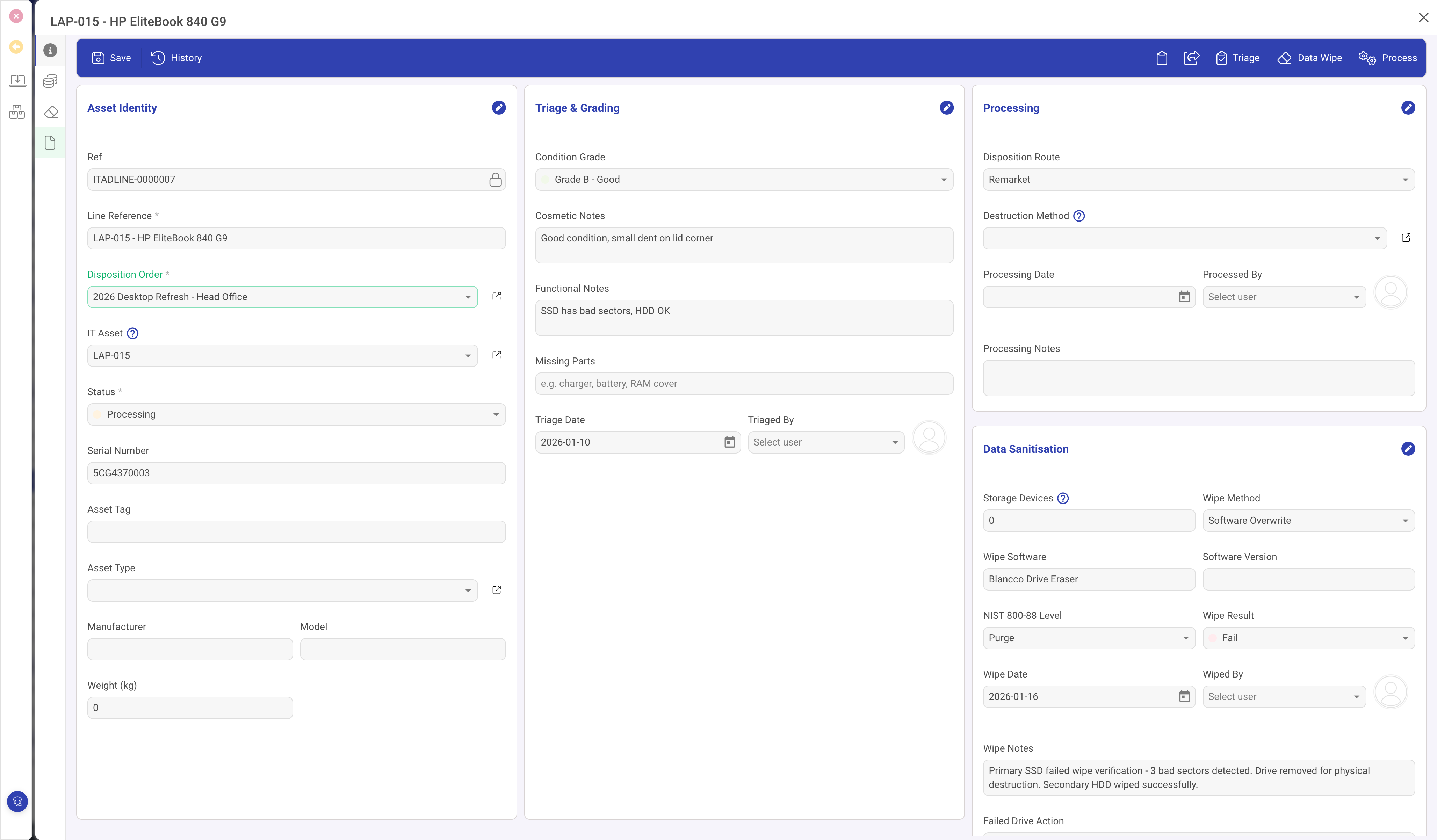
The General panel has three columns:
Asset Identity (left)
- Disposition Order: the parent order this line belongs to.
- IT Asset: optional link to a tracked IT Asset record. For tracked assets, the serial number, tag, and type are pulled automatically. For untracked equipment, enter these fields manually.
- Status: Pending > Triaged > Processing > Completed (or Cancelled).
- Serial Number, Asset Tag, Asset Type, Manufacturer, Model, Weight.
Triage and Grading (centre)
- Condition Grade: Grade A (Excellent, like new), Grade B (Good, minor cosmetic wear), Grade C (Fair, visible wear), Grade D (Poor, significant damage), Non-functional (does not power on or critical hardware failure).
- Cosmetic Notes: scratches, dents, screen condition.
- Functional Notes: boot test results, component failures, battery health.
- Missing Parts: charger, battery, RAM cover, etc.
- Triage Date and Triaged By.
Processing (right)
- Disposition Route: Remarket, Refurbish, Recycle, Destroy, Donate, Return to Vendor, or Parts Harvest.
- Destruction Method: link to a destruction method record (for recycle/destroy routes).
- Processing Date and Processed By.
Data Sanitisation
Below the Processing section, the data sanitisation fields track the overall wipe status:
- Storage Devices: number of drives in this asset.
- Wipe Method: Software Overwrite, Cryptographic Erase, Degauss, Physical Destruction, Firmware Erase, or Not Required.
- Wipe Software and Software Version.
- NIST 800-88 Level: Clear, Purge, or Destroy.
- Wipe Result: Pass, Fail, Partial, or Not Required.
- Failed Drive Action (visible when result is Fail): Physical Destruction, Degauss, or Quarantine.
For multi-drive assets, individual per-drive records provide detailed verification. See Data sanitisation and wipe records.
The Assets panel on the order
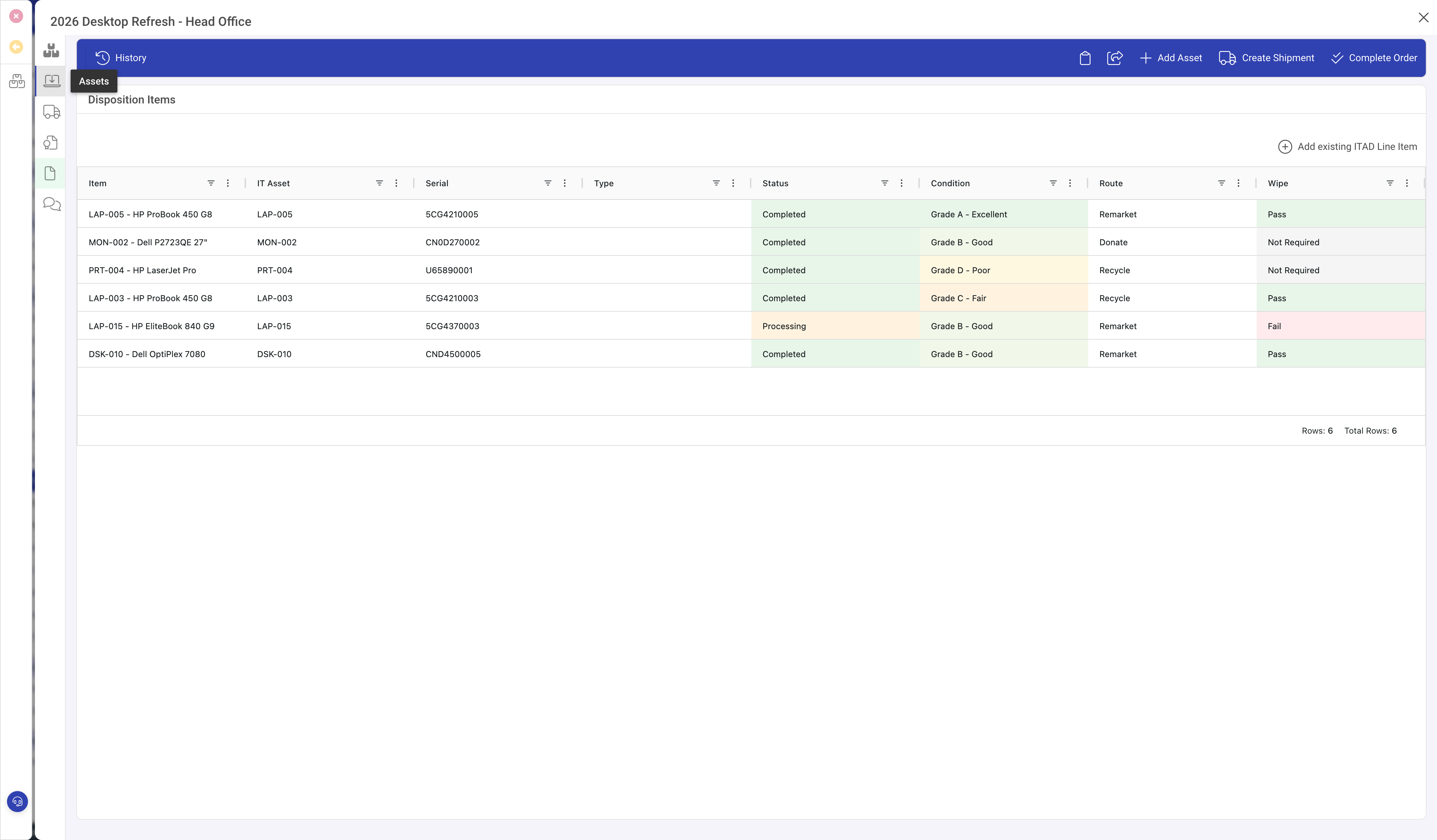
The Assets panel on the parent order shows all line items in a grid with columns for Item, IT Asset, Serial, Type, Status, Condition (colour-coded), Route, and Wipe result (colour-coded Pass/Fail). Click a row to open the line item detail.
Value Recovery panel
The second panel on the line item tracks financial recovery:
- Book Value: net book value at time of disposition.
- Disposal Cost: cost to process this specific asset.
- Estimated Resale Value and Actual Resale Value.
- Resale Channel: Auction, Direct Sale, Employee Programme, Charity, or Parts Resale.
Toolbar actions
- Triage: opens the triage workflow to assess condition and set the grade.
- Data Wipe: opens the wipe workflow to record sanitisation results and create per-drive wipe records.
- Process: executes the chosen disposition route.
Tips
- Triage before processing. The condition grade determines the appropriate route.
- Grade honestly. Over-grading wastes remarketing effort on assets that will not sell.
- Always verify data sanitisation before any asset leaves your control.
- Use the Value Recovery panel to track actual returns and compare against estimates.